Seedance 2.0 Is Now Live in Kinova Studio
Kinova Team · April 2026

Seedance 2.0 is live in Kinova Studio. You can now select it alongside Kling and Veo 3 when generating video clips.
ByteDance's latest video generation model has been one of the most talked-about releases in AI video this year. Here's what it brings to your workflow in Kinova, and why we added it.
What Seedance 2.0 actually changes
Seedance 2.0 is ByteDance's most advanced video generation model, built on a unified multimodal architecture. It's a meaningful step up from the previous generation across motion quality, visual fidelity, and fine detail rendering.
Cinematic motion quality
Camera tracking, hair and fabric movement, physics-based interactions all feel closer to real footage than what we've seen from previous models. The motion smoothing produces natural, film-like results.
Text and fine detail rendering
This is where Seedance 2.0 really stands out. On-screen text, UI elements, logos, and small details stay legible and consistent throughout the clip. If your content includes phones, screens, signs, or any text-heavy element, you'll notice the difference immediately.
Character consistency
Faces, clothing, and visual style hold across frames with less drift and fewer artifacts. For creators building recurring characters, this matters a lot.
Up to 15 seconds per clip
Longer generation with multi-shot transitions built in. More room to tell a story in a single generation.
Up to 1080p resolution
Production-ready output across multiple aspect ratios including 16:9, 9:16, 4:3, 3:4, and 1:1.
Why this matters for content creators
The challenge with AI video has always been the gap between what the model can generate and what you'd actually post. Small details break the illusion: drifting faces, illegible text, unnatural motion.
Seedance 2.0 closes that gap noticeably. In our testing, it produced the most natural-looking results for everyday scenes, the kind of content creators actually need: someone talking to camera, a product on a table, a phone screen lighting up.
Combined with Kinova's character consistency pipeline and AI scene planning, you're not just getting a better model. You're getting a better model inside a workflow designed to help you ship finished videos, not just raw clips.
How it compares
We ran the same prompt across five model variants. The results are worth seeing side by side.
Read the comparison: Seedance 2.0 vs Kling 3.0 vs Veo 3How to use it
Seedance 2.0 is available now in Kinova Studio. When generating clips for any scene, select Seedance 2.0 from the model picker. It works with the same scene planning and character consistency features you already use.
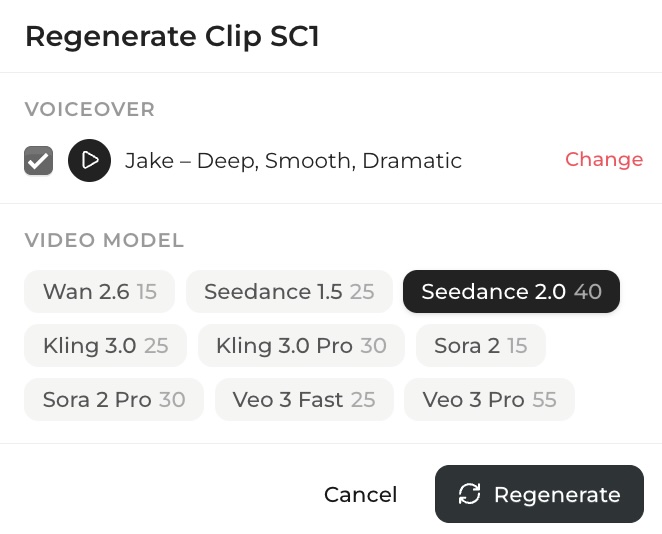
Try it alongside Veo 3 and Kling on the same scene. See which model works best for your content.